

A customer's due usually comes from a sale on due. When someone takes something on credit without a sale at the till, such as "rice and oil" written the old paper-ledger way, or a little cash, write it in their খাতা as Credit given. It raises what the customer owes and nothing else: it is not a sale, so stock, sales, profit and your money accounts do not change.
Before you begin
- The customer must be in Tukri. For someone new, first add a customer.
- The Owner, Admin and Staff roles can all record credit given. On a role you made yourself, the button shows only with the Record credit given permission.
- If the goods are products you keep in Tukri, sell them at the till on due with the customer attached instead, so the stock goes down and the sale counts: Sell on due.
- What a customer owed before you used Tukri can be entered once, when you add them: Add a new customer's previous due.
Record credit given
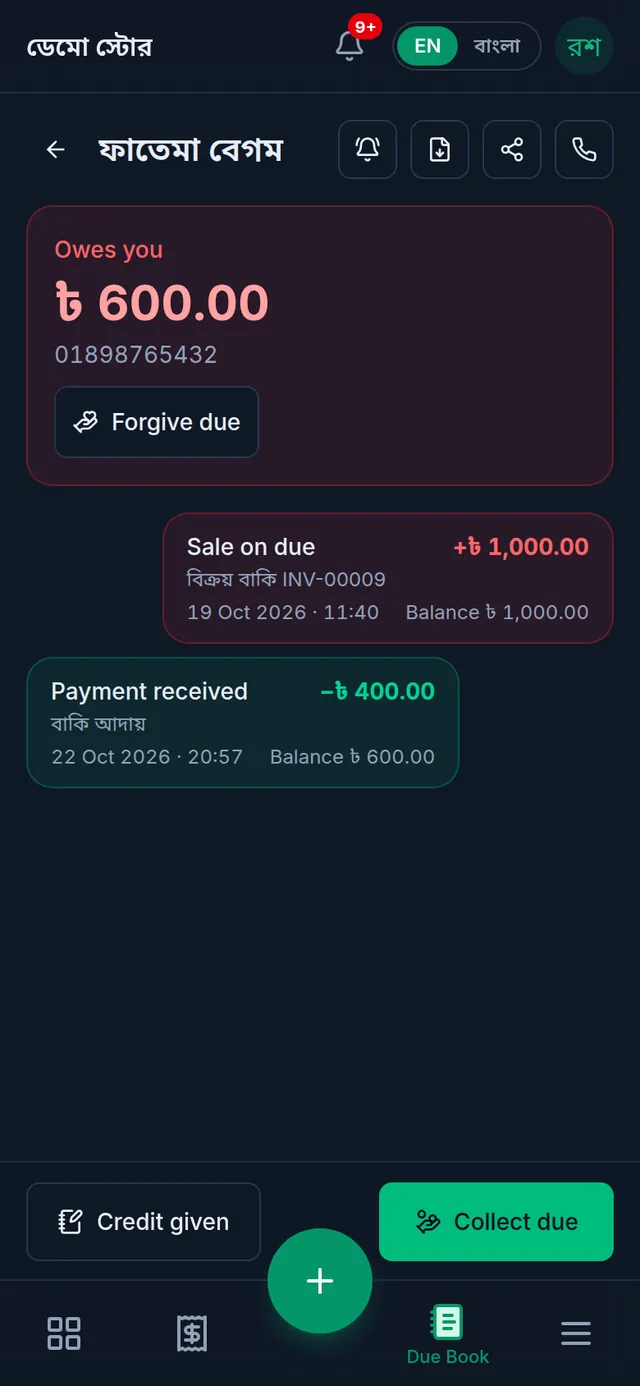
- Open Due Book (in the menu on the left on a computer, in the bar at the bottom on a phone) and tap the customer. Their খাতা opens.
- Tap Credit given at the bottom.
- Type the amount on the keypad. Up to two decimal places (paisa) are allowed.
- Under What is it for?, write what it was for, such as "rice, lentils and oil". Or tap Groceries, Rice and oil or Goods on credit to fill it in. It cannot be left empty.
- Leave the Date empty and it is recorded now, or pick yesterday. An earlier day is not accepted, so write it in the description.
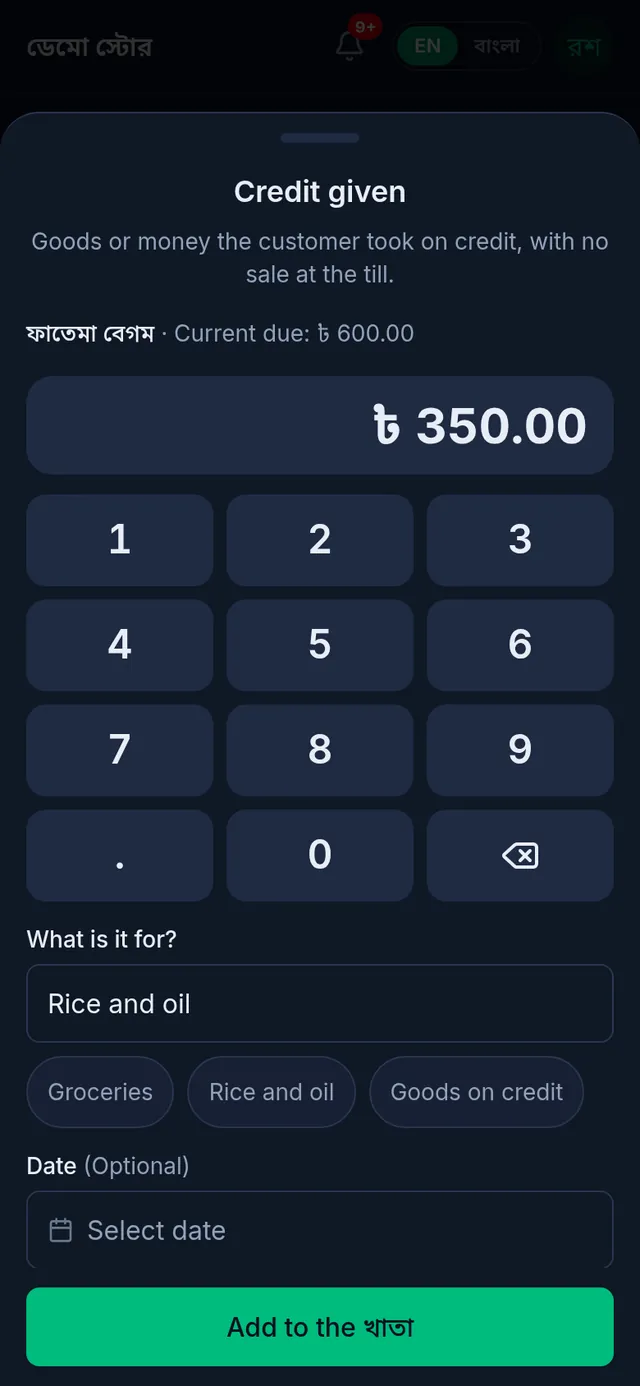
- Tap Add to the খাতা.
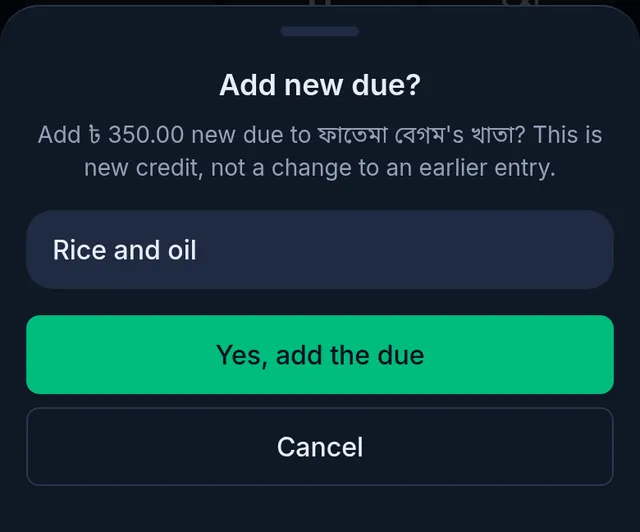
- Add new due? asks again, with the customer's name and the amount. If it is right, tap Yes, add the due. If not, tap Cancel and fix it.
What happens next
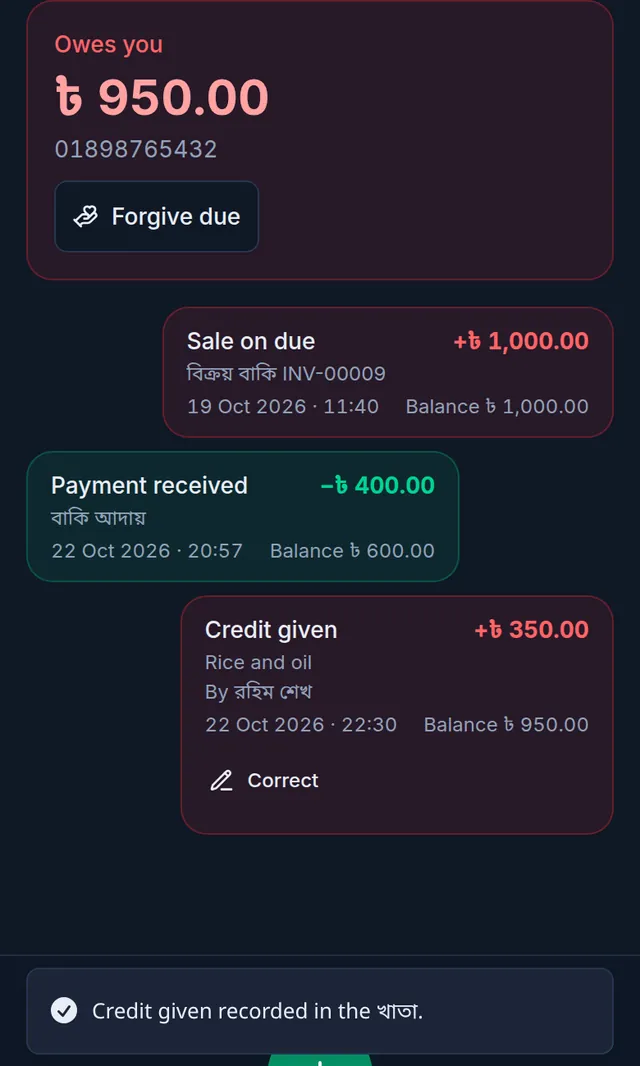
Tukri shows "Credit given recorded in the খাতা.". A Credit given entry is added to the খাতা with your description, who wrote it and when, and what the customer owes goes up by that much.
- It is not a sale: no invoice, no stock leaves, and it is not counted in sales, profit or VAT.
- No money account changes either. If you lend cash from the drawer, Tukri's cash balance does not go down by itself; to keep it matching, record that cash as Take out in Money: Cash, bank and bKash accounts.
- The entry and its description also appear on the customer's statement and shared খাতা: A customer's statement and due history.
- When the customer pays, record it with Collect a customer's due.
If something goes wrong
I do not see Credit given. Your role does not have the Record credit given permission. Ask the shop's owner.
I typed the wrong amount. Entries in a খাতা cannot be edited or deleted. If it is too high, the shop's owner taps Correct on that entry and types the right amount: Correct a wrong Due Book entry. If it is too low, write another Credit given for the rest.
It says "Pick today or yesterday: an earlier date cannot be recorded here." You picked a day before yesterday. Pick today or yesterday, or leave it empty, and write the real date in the description.
It says "One entry can be at most ৳1,00,00,000." One entry can be at most one crore taka.
I tapped twice. The entry is written once, and Tukri says "Already saved. Nothing was added twice."
The customer is not in the Due Book list. Customers who owe nothing right now are left out of the list. Open them from Customers and tap View ledger; the same button is there.
It says "Adding or reducing a due by hand has changed. Reload the page and use Credit given, or ask the owner to correct the entry." An old Tukri page was still open on your phone. Reload the page and try again.
Watch the video

What the video says
A customer took goods on due without making a sale? Or did you write something wrong in the খাতা? Let's look at both.
Open Due Book from the bar at the bottom, then tap the customer's name. Tap Credit given at the bottom.
Type the amount on the keypad. Write what the due is for, or tap one of the ready-made words below. Leave the date empty and it is written for today, or you can pick yesterday's date.
Tap Add to the খাতা, then Yes, add the due. The customer's due goes up by that much. This is not a sale, so stock and cash do not change.
A খাতা entry cannot be deleted or edited. If it is wrong, the shop's owner fixes it. Tap Correct under the wrong entry.
Type what the right amount was. Below, it shows how much the due goes down. Then write the reason and tap Review. If it is right, tap Yes, correct it. The original entry stays, and the correction is written below it.
If a payment was recorded wrongly, tap Correct payment under it. Now choose what went wrong: Money never came, wrong account, or wrong customer. For a wrong account, choose the right account. Write the reason, review it and confirm. The money moves to the right account.
Keep your dues clear and simple, tukri.bd
Related articles
- Collect a customer's due When a customer pays their due, record it in their খাতা: how much, and whether it came in cash, to the bank or by mobile banking. The due drops at once.
- Correct a wrong Due Book entry or payment When credit given or a previous due was typed too high, or a payment went to the wrong account or customer, the owner corrects it. The original stays.
- Sell on due and take part payment Attach a customer while selling and leave the whole bill, or what is left of it, as due in their খাতা. Taking part now and the rest later works the same way.
- Add a new customer's previous due Bring in what a customer owed you before Tukri, once, as a previous due when you add them. Only the shop's owner can do it.
- Download a customer's statement or share their খাতা Download a customer's whole due history as a PDF statement, or send them a read-only link on WhatsApp. A link stays open for 30 days.
Still need help?
Write to us, call or send a WhatsApp message, and someone from Tukri will help you.
