

On this page
Every courier uses its own words for where a parcel is. Tukri turns them into one set of statuses, shown as a coloured badge on each parcel, and checks with the courier by itself every few hours. A status never moves stock or money on its own: goods go back into stock only when you confirm a return, and the cash on delivery comes off the buyer's due only when you confirm what the rider collected.
Before you begin
- Everyone who can open Delivery can follow parcels and see the Returns tab.
- Confirming a return or marking a parcel lost needs permission to handle delivery returns; cancelling an order needs permission to cancel deliveries and to void sales. The Owner and Admin roles have these; Staff do not, unless the owner changed the role.
Follow a parcel
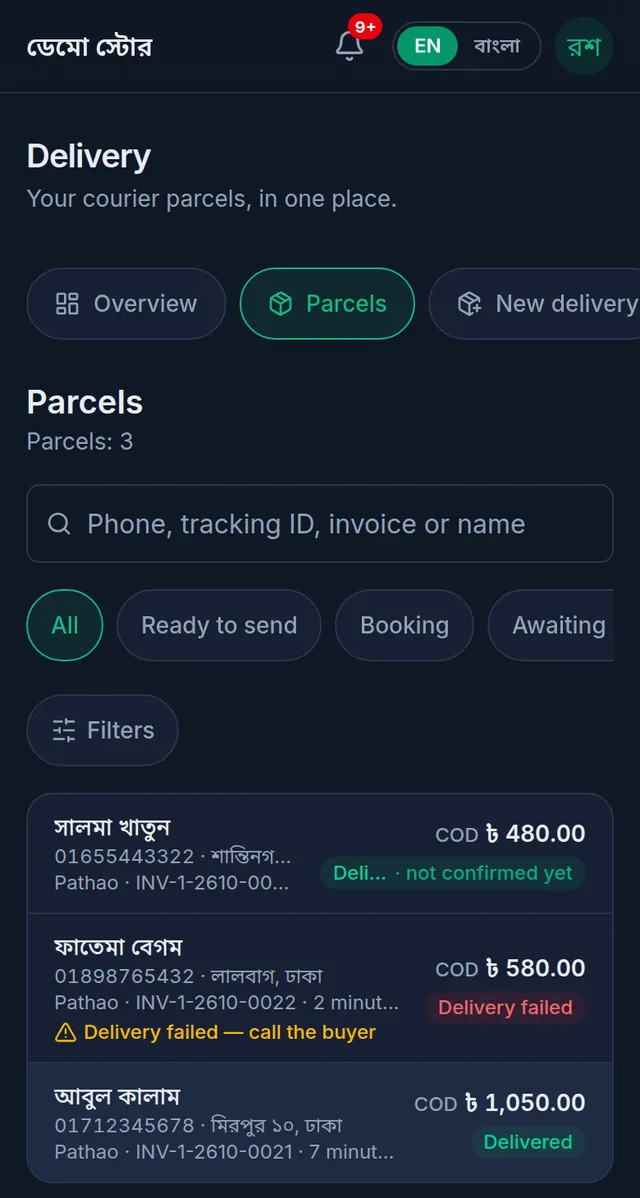
- Open Delivery › Parcels. Each row shows the buyer, the courier, the invoice, the COD and the status. Search by phone, tracking ID, invoice or name, tap a status above the list, or tap Filters to narrow it by courier, date, payment or return.
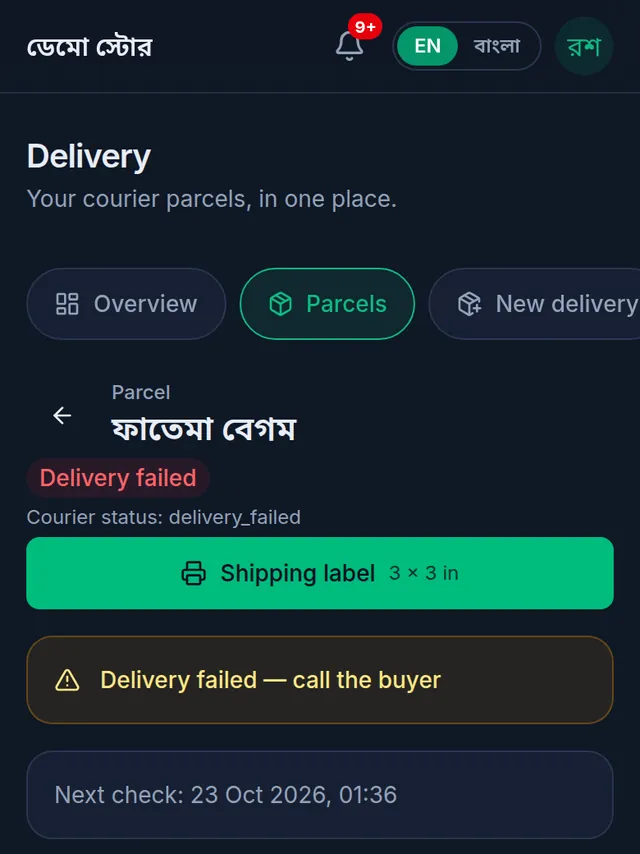
- Tap a parcel. Its page shows the status, with the courier's own word just under it, and when Tukri will next check with the courier. Further down are the recipient, the items, the money and the Timeline: every update, newest first. A booked parcel also shows its Consignment ID, Tracking ID and Order reference (it starts with TK; tap Copy to search for it in the courier's panel).
- To ask the courier now, tap Refresh from courier on the parcel. Sync status on the Overview asks about all your parcels at once.
- When a parcel needs you, a short amber note on it says why, for example "Delivery failed — call the buyer". The same parcels are listed first on the Overview, under Needs your attention. The note goes away once the parcel is dealt with.
What the statuses mean
While it is being sent
- Ready to send: saved in Tukri, not sent to the courier yet.
- Sending to courier: Tukri is sending it to the courier now.
- Booking failed: the courier did not take it, or it was not sent. Nothing was booked.
- Booking unclear: the courier's answer was not clear. Check the courier's panel before sending it again. See Book a parcel with a courier.
With the courier
- Booked: the courier accepted it.
- Pickup requested, Rider assigned: the courier is arranging the pickup. Pickup failed: the courier could not collect it.
- Picked up, At the sending hub, In transit, At the delivery hub: on its way. With the courier: the courier has it but does not report the finer steps.
- Out for delivery: a rider is taking it to the buyer.
- On hold: the courier is holding it for now; the courier's own word on the page may say why.
- Delivery failed: the delivery attempt failed. Call the buyer.
Results
- Delivered: the courier says it was delivered. Until someone confirms it, the badge adds "not confirmed yet".
- Partially delivered: the buyer kept part of it; the rest comes back.
- Return requested, Coming back: the parcel is coming back to your shop. Returned to shop: the courier says it is back.
- Cancelled: cancelled before pickup, or closed in Tukri.
- Lost or damaged: marked lost, or reported lost or damaged by the courier.
Not every courier reports every step, so a parcel can skip some of these.
Confirm a delivery
No courier's word is taken as final on its own. When a parcel shows Delivered · not confirmed yet, check it in the courier's own panel or app, then on the parcel's page either:
- tap Confirm COD collected and enter what the rider collected (this also confirms the delivery; see Delivery charge and cash on delivery), or
- tap Confirm result, write a Note saying what the courier's panel shows, and tap Confirm.
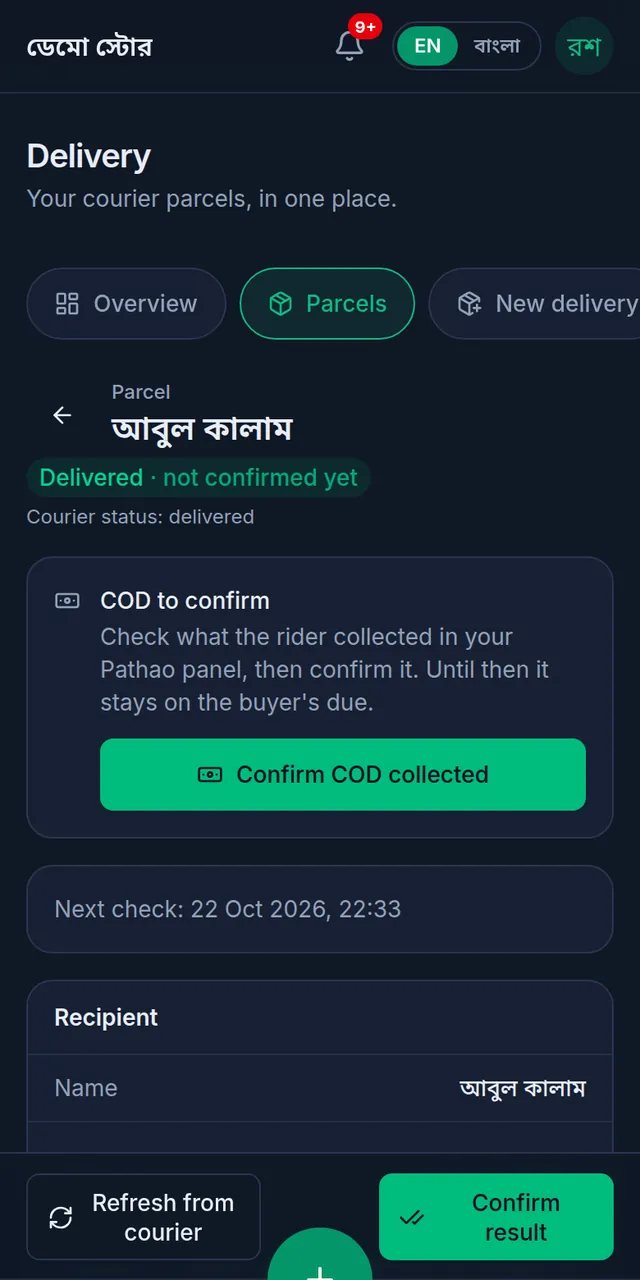
Tukri records who confirmed it, with the note. Some couriers approve a result on their side first; until they do, Tukri does not offer the button.
Cancel an order
- Not with the courier yet (Ready to send or Booking failed): open the parcel and tap Cancel order. Tukri asks "Cancel this order?": The sale is voided: its items go back into stock, and its payments and the customer's due are reversed. The parcel is closed. This cannot be undone. Tap Cancel order again to go ahead, or Keep the order.
- Already with the courier: cancel it in the courier's own panel or app. When the courier reports Cancelled, confirm that with Confirm result. Then Cancel order voids the sale, or Make a new parcel sends the same order again with the same or another courier.
A parcel comes back
- When the courier reports a return, the parcel shows "Coming back to your shop" and is listed under Delivery › Returns.
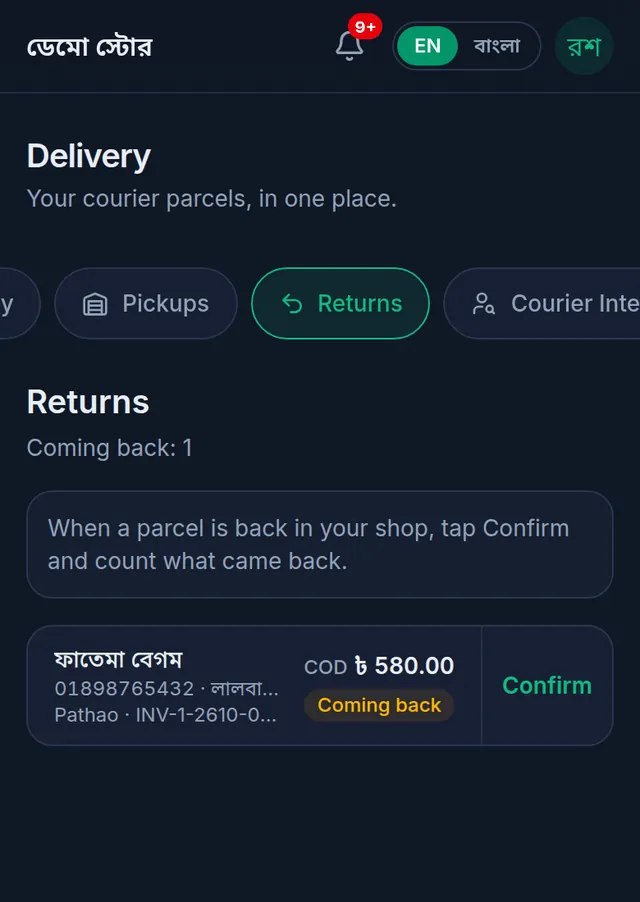
- Wait until the goods are physically in your shop. Then tap Confirm on its row, or Confirm return received on the parcel's page.
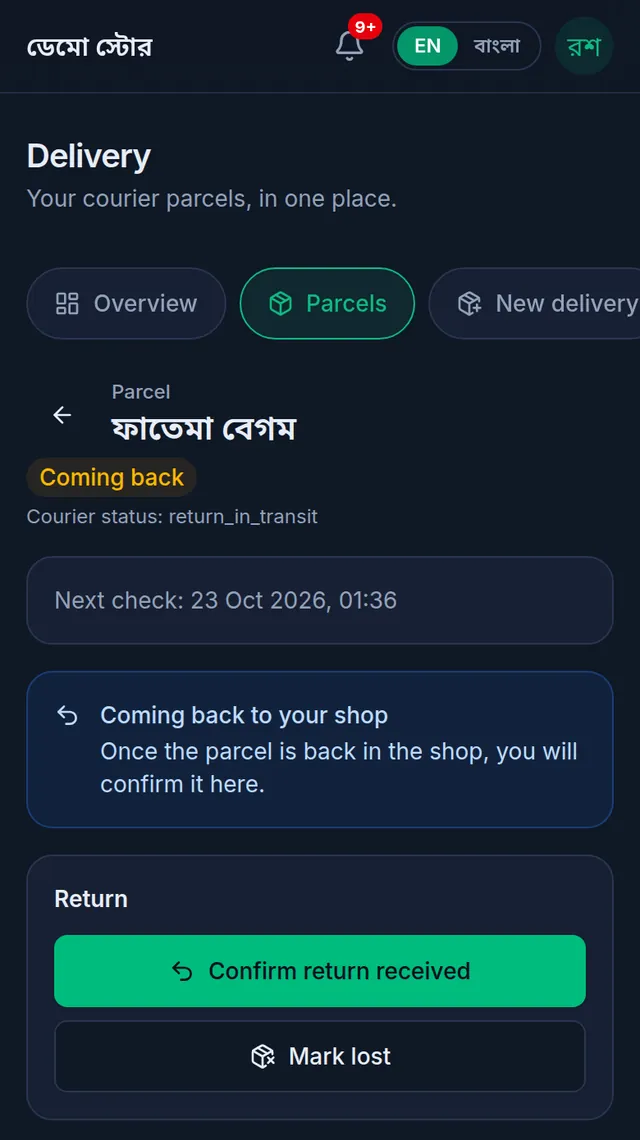
- For each item, enter how many Can be sold and how many Damaged. All back fills in everything that was sent. Whatever you do not enter counts as kept by the buyer.
- If the buyer had paid something, choose under Money back to the buyer how it goes back. The choices depend on the sale, for example Back to where it was paid or Keep as the buyer's credit.
- Read What will happen, then tap Confirm return.
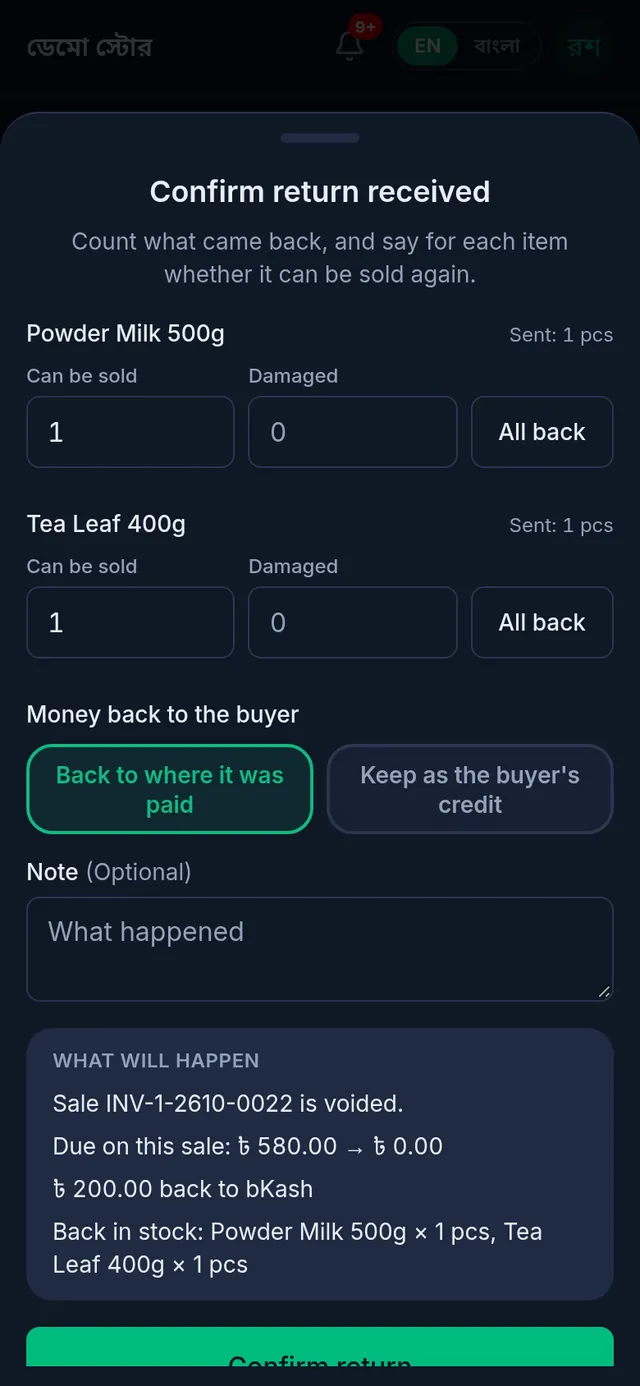
Tukri says "Return confirmed. The stock and the money are put right." Items you counted as sellable go back into stock; damaged ones are written off. When every item came back sellable, nothing was collected and the sale had no earlier return, the whole sale is voided. Otherwise Tukri makes a credit note for what came back: it first comes off what the buyer still owes on the sale, and only money paid beyond that goes back, the way you chose.
The parcel never left your shop. If the courier never collected it, cancel it in the courier's panel first, then tap Goods are back in the shop on the parcel's page. Every item comes back in full.
The parcel is lost. When the courier confirms a parcel it picked up is lost, tap Mark lost, tick that you checked with the courier, and write a note. The goods are written off as lost in transit, and the buyer no longer owes for them.
The buyer kept part of it. For a partial delivery, or a return the buyer paid something on, first confirm the COD the rider collected (see Delivery charge and cash on delivery), then confirm the return counting only what came back.
If something goes wrong
The status has not changed for a while. Tap Refresh from courier on the parcel. "Status was synced a moment ago. Try again in 2 minutes." means it was just checked: wait and try again. If the page says the courier login must be entered again, ask whoever manages courier accounts to reconnect it: Connect your courier account.
I cannot return or void the sale from its own page. "Return and void are off while this sale's parcel is waiting to go or with the courier." Handle the parcel from its page in the Delivery Hub instead.
"The courier reported money collected on this parcel. Use "Confirm COD collected" first (৳0 if the rider collected nothing), then confirm the return." Confirm the COD first, even ৳0, then confirm the return.
"This parcel is not coming back, so there is nothing to confirm yet." The courier has not reported this parcel coming back yet. Tap Refresh from courier, or check the courier's panel.
"An order can be cancelled only before it is sent to the courier, or after the courier has cancelled it." The courier already has the parcel: cancel it in the courier's own panel first.
The What will happen box says a permission is missing. Your role cannot return or void sales. Ask the shop owner to confirm the return.
Watch the video
What the video says
Where is the parcel now? What do you do when it comes back? Let's see it in Tukri.
In Delivery, go to the Parcels tab. Each parcel shows a coloured status. You can also search by name, phone or tracking ID.
Tap a parcel, and at the top is its status, with the courier's own words. Every few hours, Tukri checks with the courier by itself, and shows when the next check is. To find out right now, tap Refresh from courier. Every update is in the Timeline below.
When you need to act, an amber note shows, like "Delivery failed — call the buyer".
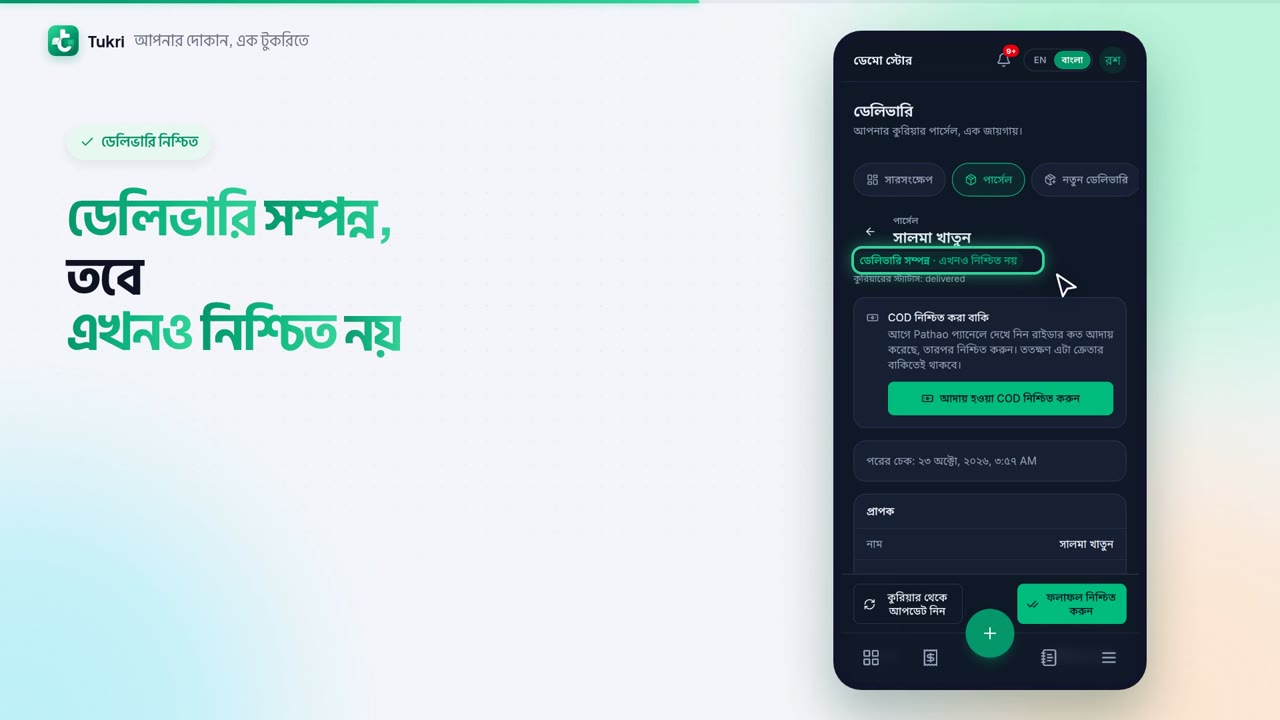
Even when the courier says Delivered, it still says not confirmed yet. Check it in the courier's panel, then tap Confirm result. If the rider collected money, confirm that too.
When a parcel comes back, it moves to the Returns tab. When the goods reach your shop, tap Confirm. Enter how many Can be sold and how many are Damaged. If money was paid in advance, choose how it goes back. Then tap Confirm return. Sellable items go back into stock. By default, the Owner and Admin can do this.
Keep track of your parcels with ease, tukri.bd
Related articles
- The Delivery Hub Send and follow courier parcels with your own Pathao, Steadfast, REDX, Paperfly or CarryBee account. What each tab does and who can see it.
- Delivery charge and cash on delivery How the delivery charge and the COD are worked out on a delivery order, how to confirm what the rider collected, and how to record a courier's payout.
- Return items or void a sale Take some items back with a cash refund or store credit, or cancel a wrong sale altogether. Either way the stock and money are put right by themselves.
Still need help?
Write to us, call or send a WhatsApp message, and someone from Tukri will help you.
