

On this page
Courier Intelligence, in the Delivery Hub, looks up a buyer's mobile number and shows how deliveries to it have gone: your own shop's parcels to that number, and the customer history that your connected Steadfast, Pathao or Paperfly account shares. It sums them up in one word, such as Strong delivery history or Higher delivery risk: a summary, never a number or a score. Check before you send a cash-on-delivery parcel, above all to someone new.
Before you begin
- The Delivery Hub must be on, and your plan must include it: see Turn on the Delivery Hub.
- Courier history comes only from the courier accounts your shop connected and kept switched on: Steadfast, Pathao or Paperfly. With no courier connected, a lookup shows your own shop's history only. See Connect your courier account.
- Your role must allow seeing deliveries. The Owner, Admin and Staff roles have it unless the owner changed them.
Look up a number
- Open Courier Intelligence.
On a computer
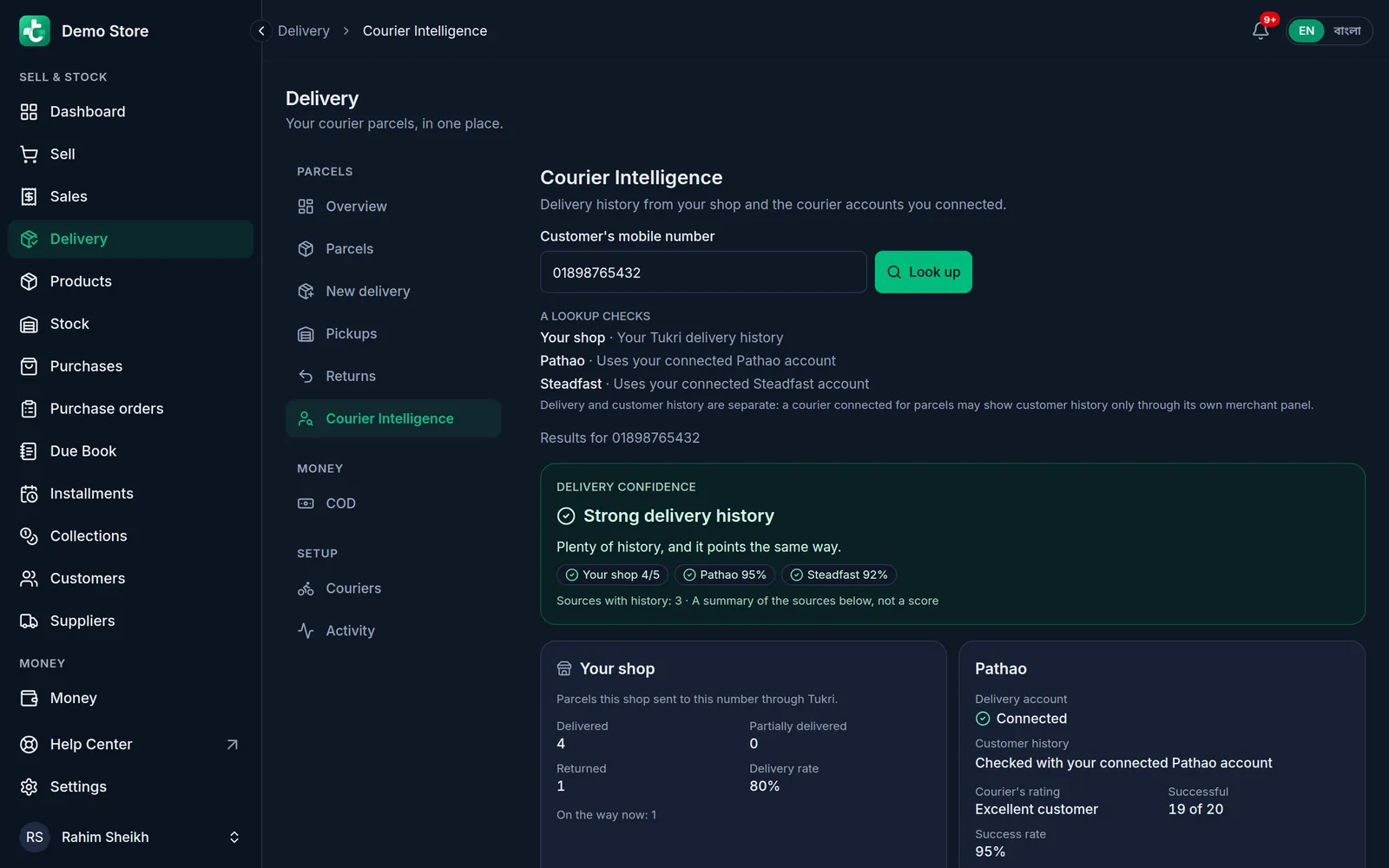
Click Delivery in the menu on the left, then Courier Intelligence in the list beside the page.
On a phone or tablet
Tap Menu, then Delivery. In the row of buttons at the top, tap Courier Intelligence; slide the row sideways if you do not see it.
- Under A lookup checks you see, before you type anything, your shop and each connected courier, and whether that courier's customer history can be checked.
- Type the buyer's number in Customer's mobile number and tap Look up.
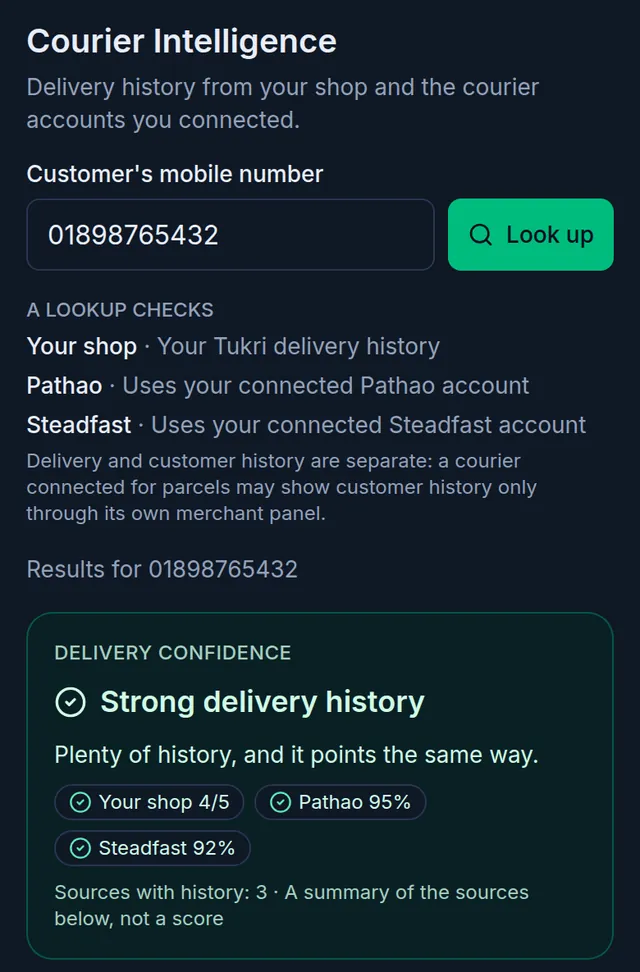
- Read Delivery confidence at the top of the results: the word, a one-line reason, and a chip for each source with that source's own figure, such as how many of your parcels to the number were delivered.
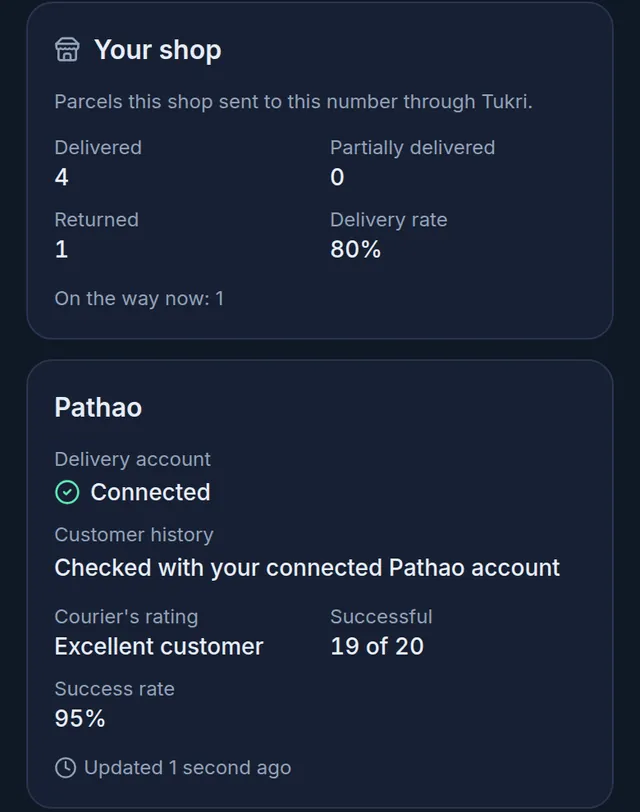
- Below it, the Your shop card and one card for each courier show the details.
- To ask the couriers again later, tap Refresh available sources. As the line beside it says: "A courier is asked again only once its saved answer is 15 minutes old."
What the word means
- Strong delivery history: plenty of history, all pointing the same good way.
- Generally positive: the history leans positive, sometimes with a concern a courier reported.
- Mixed delivery history: the sources point different ways, or deliveries to this number succeed only part of the time.
- Higher delivery risk: the history shows returns, or concerns reported by couriers.
- Limited delivery history: too little history to lean on, as for a number nobody has sent to yet.
Each source is read on its own: one courier's figures are never added to or averaged with another's, and your shop's own history can earn the top word by itself once enough of your parcels to that number have finished. The page says it plainly: "Courier and shop delivery history helps you assess delivery risk. It does not guarantee how a customer will behave on a new order."
The cards
- Your shop counts the parcels your shop sent to that number that a courier actually took: Delivered, Partially delivered, Returned and the Delivery rate, and how many are on the way now. A partial delivery counts as delivered in the rate. Parcels that never reached a courier, were cancelled or were lost by the courier are left out, and only a parcel's main mobile number is matched. Other shops' parcels are never shown.
- Each courier card has two lines. Delivery account says whether your connection for sending parcels works. Customer history says whether the number was checked with your connected account, or why it could not be. When it was, the card shows the courier's own figures in its own terms, for example Courier's rating, Successful or Success rate. A rating is the courier's word, not Tukri's.
Looking up a number changes nothing at the courier, and it never stops you sending a parcel.
On New delivery, at the till and on chat orders
The same summary, made small, appears where you need it, so you do not have to leave the screen:
- On New delivery, once the buyer's whole mobile number is in, a small box under the numbers shows the word and the chips. View details opens the full page in a new tab, so the order you are typing stays as it is.
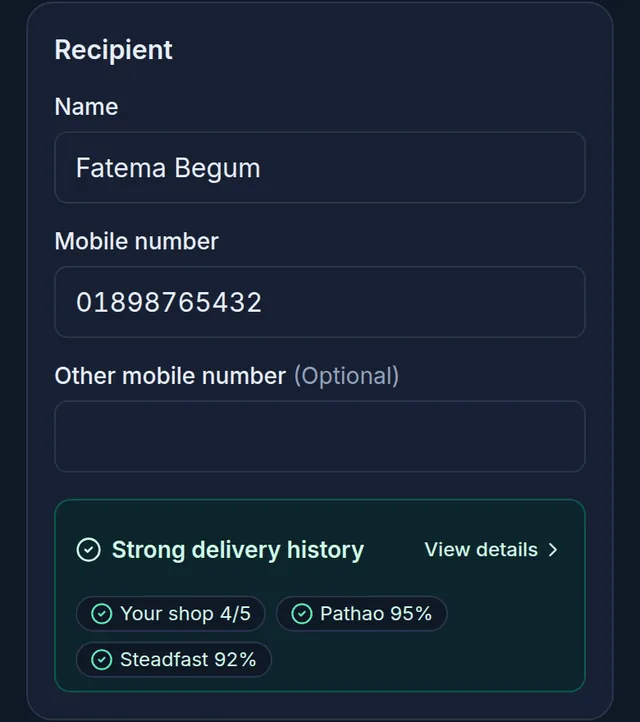
- At the till, when you attach a saved customer who has a mobile number and the till is online. To spare the couriers' lookups, the till first shows only your shop's history and the couriers' answers already saved; when some couriers were not asked, tap Check couriers to ask them.
- On a chat order still waiting for your approval in Social Commerce: in the Courier history box, tap Check. See Social Commerce.
The small box never holds up a sale or a parcel. On New delivery and at the till, if a lookup fails, the box simply does not appear.
If something goes wrong
"Enter a Bangladeshi mobile number, like 01712345678." Type a Bangladeshi mobile number: 11 digits, starting with 01.
"Your plan no longer includes the Delivery Hub, so new lookups are off." The number box is greyed out because your plan does not include the Delivery Hub, or the subscription has run out. The shop's owner can renew, or choose a plan that includes the Delivery Hub.
"Too many lookups in a minute. Wait a moment and try again." Each person can look up 20 numbers a minute, and a shop 1,000 a day. Wait a moment and try again.
"The lookup did not finish. Try again." Tap Try again.
A courier card says Lookup limit reached. That courier's own lookup allowance is used up for now. Try again later; the other cards still work.
A courier card says Couldn't reach the courier. The courier did not answer. Try again in a few minutes.
A courier card says Not checked and Login needed again. The courier no longer accepts the saved login. Whoever manages your courier accounts enters it again under Couriers. See Connect your courier account.
A card says Showing saved result. A fresh answer could not be fetched, so the last saved one is shown.
A CarryBee or REDX card has no history. CarryBee says Merchant session required and REDX Not available: neither shares customer history with Tukri. Sending parcels with them is not affected.
Related articles
- Connect your courier account Connect your own Pathao, Steadfast, REDX, Paperfly or CarryBee merchant account: copy its login from the courier's panel, test the connection, and save.
- Book a parcel with a courier Enter a phone or online order in New delivery, or send a sale you already made, and book it with your own courier account in a few taps.
- Delivery charge and cash on delivery How the delivery charge and the COD are worked out on a delivery order, how to confirm what the rider collected, and how to record a courier's payout.
Still need help?
Write to us, call or send a WhatsApp message, and someone from Tukri will help you.
